-
+86 133 9281 9446
+86 133 9281 9446
This guide defines the 50 most essential terms in cnc machining. A strong grasp of cnc terminology supports clear communication and accurate operation in any machining environment. People in the cnc field often use specialized language when discussing computer numerical control, cnc tooling, and machining processes. The glossary format allows users to look up terms quickly. Both beginners and experienced professionals can use this reference to build confidence in cnc technology and machining vocabulary.
CNC stands for computer numerical control. This technology uses computers to automate and control machining tools. Operators input instructions into a computer, which then directs the movement and operation of machines such as mills, lathes, and routers. CNC machining allows for precise, repeatable, and efficient production of parts. In a typical scenario, an engineer designs a part using software, then uploads the instructions to a CNC machine. The machine follows the programmed path to cut, drill, or shape the material. CNC technology has transformed manufacturing by increasing accuracy and reducing manual labor.
An axis in CNC machining refers to a direction along which a machine tool or workpiece can move. Most CNC machines operate on three primary axes: X (left to right), Y (front to back), and Z (up and down). Some advanced machines add more axes, allowing for complex movements and shapes. For example, a 5-axis CNC machine can tilt and rotate the tool or workpiece, making it possible to create intricate parts in a single setup. In practice, understanding the axis system helps operators set up jobs correctly and avoid collisions during machining.
Axis | Direction | Example Movement |
|---|---|---|
X | Left to Right | Moving the table horizontally |
Y | Front to Back | Sliding the table in and out |
Z | Up and Down | Raising or lowering the spindle |
Absolute programming is a method used in CNC machining to specify the position of a tool or workpiece. In this system, all coordinates reference a fixed origin point, often called the zero point. Each movement command tells the machine to go to a specific location based on this origin. For example, if the origin is set at the corner of a workpiece, a command to move to X50 Y25 means the tool will move to a point 50 units right and 25 units up from the origin. This approach makes it easier to track positions and reduces mistakes during complex cnc machining processes.
A machinist might use absolute programming when producing multiple identical parts. By referencing the same origin each time, the operator ensures every part matches the design exactly. This method supports high precision and repeatability in cnc machining.
Incremental programming is a method used in cnc machining to control the movement of a tool or workpiece. In this system, each position command tells the cnc machine to move a certain distance from its current location, not from a fixed origin. Operators use this approach when they want to make a series of movements that depend on the previous position. For example, if a machinist wants to drill several holes in a straight line, incremental programming allows the cnc to move the same distance between each hole, no matter where the starting point is.
This method helps reduce errors when repeating patterns or steps. Many cnc machines support both incremental and absolute programming. Operators choose the best method based on the part design and the machining process. Incremental programming is especially useful in tasks like slotting, drilling, or when creating features that repeat at regular intervals.
G-Code is the standard language used to control cnc machines. It tells the machine how to move, what speed to use, and which operations to perform. Each line of G-Code gives a specific instruction, such as moving the tool to a certain position, turning on the spindle, or changing the feed rate. G-Code is essential for cnc machining because it translates the part design into precise machine actions.
A typical G-Code command looks like this:
G01 X50 Y25 F100
This line tells the cnc machine to move the tool in a straight line to position X50 Y25 at a feed rate of 100 units per minute. Machinists often use computer-aided manufacturing (CAM) software to generate G-Code automatically from a digital design. However, understanding G-Code allows operators to make manual adjustments and troubleshoot problems during machining.
G-Code Example | Description |
|---|---|
G00 | Rapid positioning |
G01 | Linear interpolation (cutting) |
G02 | Clockwise arc |
G03 | Counterclockwise arc |
G-Code plays a key role in cnc machining vocabulary. It forms the foundation of cnc terminology and appears in every cnc glossary.
M-Code stands for "miscellaneous code" in cnc machining. While G-Code controls movement and cutting, M-Code manages machine functions that do not involve tool paths. These functions include starting or stopping the spindle, turning coolant on or off, and changing tools. Each cnc machine may have its own set of M-Codes, but some codes are common across many brands.
For example, the command M03 starts the spindle in a clockwise direction, and M08 turns on the coolant. Operators use M-Codes in combination with G-Code to control all aspects of the machining process. Understanding both types of codes helps machinists run cnc machines safely and efficiently.
Tip: Always check the cnc machine's manual for the correct M-Codes. Different machines may use different codes for the same function.
M-Code is an important part of cnc machining terms. It helps operators manage the full range of machine operations, from basic machining to advanced cnc processes.
A workpiece is the raw material that undergoes transformation during cnc machining. Operators place the workpiece on the machine table or secure it in a chuck before starting the machining process. The workpiece can be metal, plastic, wood, or composite, depending on the final product requirements. In cnc, the machine removes material from the workpiece to create the desired shape or features.
During cnc machining, the workpiece must remain stable. Any movement can cause errors or defects. Operators often use fixtures or vises to hold the workpiece securely. The size, shape, and material of the workpiece influence the choice of cutting tools and machining strategies.
Tip: Always inspect the workpiece for defects before starting cnc machining. Surface flaws or internal cracks can affect the final part quality.
Practical Application:
A machinist receives an aluminum block as a workpiece. He loads the block onto a cnc milling machine. The machine follows programmed instructions to cut, drill, and shape the block into a precision component for an automotive assembly.
Common Workpiece Materials in CNC Machining:
Material | Typical Use Cases |
|---|---|
Aluminum | Aerospace, automotive parts |
Steel | Industrial machinery, tools |
Brass | Fittings, valves, electronics |
Plastic | Prototypes, medical devices |
Titanium | Medical implants, aerospace |
A fixture is a device that holds, supports, and locates the workpiece during cnc machining. Fixtures ensure that the workpiece stays in the correct position throughout the machining process. This stability allows the machine to cut or shape the material with high accuracy and repeatability.
Fixtures come in many forms. Some are custom-made for specific parts, while others are adjustable for different shapes and sizes. In cnc, using the right fixture reduces vibration and prevents movement, which helps achieve tight tolerances and smooth surface finishes.
Operators select fixtures based on the workpiece geometry and the type of machining operation. For example, a machinist may use a vise as a fixture for a rectangular block or a custom clamp for an irregularly shaped casting.
Note: Proper fixture selection improves efficiency and safety in cnc machining. A secure fixture prevents accidents and reduces the risk of damaging the workpiece or the machine.
Practical Application:
An engineer needs to machine several identical parts from steel rods. She designs a fixture that holds multiple rods at once. The cnc machine then performs drilling and milling operations on all rods in a single setup, saving time and ensuring consistent results.
Types of Fixtures in CNC Machining:
Vises
Clamps
Jigs
Modular fixtures
Custom fixtures
Each fixture type serves a specific purpose in cnc machining. Choosing the right fixture is essential for achieving the best results in any machining project.
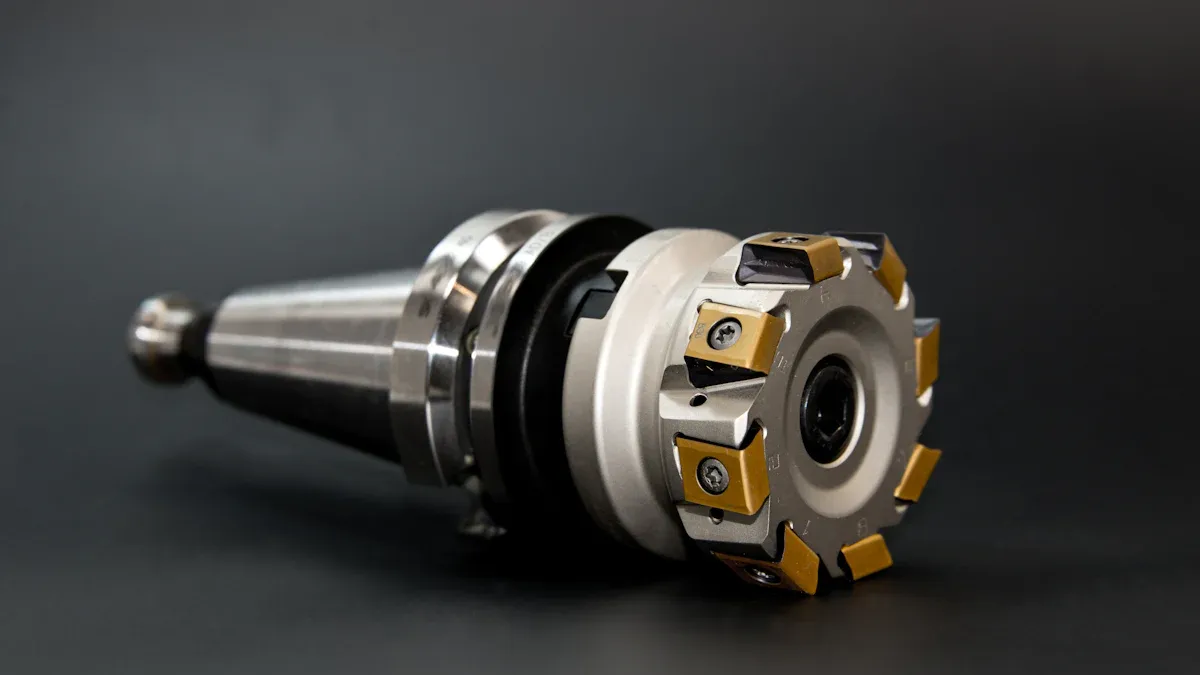
The spindle is a central part of cnc machines. It holds and rotates the cutting tool during machining. The spindle receives power from the machine’s motor and transfers it to the tool, allowing precise cutting, drilling, or shaping of the workpiece. In cnc machining, the spindle speed and torque affect the quality and efficiency of the process. Operators select spindle speeds based on the material and the type of machining operation.
A high-speed spindle can produce smooth finishes on aluminum or plastic. A low-speed spindle works better for hard materials like steel. The spindle’s design varies between cnc machines. Vertical machining centers use a vertical spindle, while cnc lathes use a horizontal spindle.
Tip: Regular spindle maintenance ensures consistent performance and extends the life of cnc machines.
Practical Application:
An engineer sets the spindle speed to 10,000 RPM for a cnc machining job on an aluminum part. The spindle rotates the end mill, allowing precise milling and drilling.
The bed is the foundation of a cnc machine. It supports the workpiece, fixtures, and other components during machining. The bed must be rigid and stable to prevent vibrations and movement. Most cnc machines use cast iron or steel beds for strength and durability. The bed’s surface is usually flat and smooth, which helps achieve accurate machining results.
Operators place the workpiece and fixtures on the bed before starting cnc machining. The bed’s design affects the size and type of parts that the cnc machine can handle. Large beds allow machining of big components, while smaller beds suit precision parts.
Bed Material | Common Use |
|---|---|
Cast Iron | Heavy-duty machining |
Steel | General machining |
Aluminum | Lightweight parts |
Practical Application:
A machinist mounts a steel plate on the bed of a cnc machine. The bed keeps the plate steady while the spindle performs milling and drilling operations.
The chuck is a clamping device used in cnc machines to hold the workpiece securely during machining. Chucks come in different types, such as three-jaw, four-jaw, and collet chucks. The choice depends on the shape and size of the workpiece. In cnc lathes, the chuck rotates the workpiece while the cutting tool shapes it. In milling machines, the chuck may hold the tool or the part.
A well-chosen chuck prevents movement and ensures accurate machining. Operators adjust the chuck to grip the workpiece tightly. Safety is important when using chucks, as loose parts can cause accidents.
Note: Always check the chuck’s grip before starting cnc machining to avoid errors and ensure safety.
Practical Application:
A technician uses a three-jaw chuck to hold a round metal rod in a cnc lathe. The chuck rotates the rod while the cutting tool creates threads along its surface.
A tool holder is a device that connects the cutting tool to the spindle of a cnc machine. It plays a key role in cnc machining by securing the tool during high-speed operations. Tool holders come in many types, such as collet chucks, end mill holders, and hydraulic tool holders. Each type supports different machining needs. The right tool holder ensures the tool stays stable, which improves accuracy and surface finish.
Operators select tool holders based on the machining operation and the type of tool used. For example, a machinist may use an end mill holder for milling or a collet chuck for drilling. The tool holder must fit both the tool and the spindle of the cnc machine. A secure fit reduces vibration and prevents tool breakage.
Tip: Regular inspection of tool holders helps maintain precision in cnc machining. Worn or damaged holders can cause poor machining results.
Practical Application:
An engineer sets up a cnc machine for a precision milling job. He chooses a high-precision tool holder to secure the carbide end mill. This setup allows the machine to cut complex shapes with tight tolerances.
A collet is a type of tool holder that grips the cutting tool or workpiece with even pressure. It looks like a sleeve with slits that allow it to contract when tightened. In cnc machining, collets hold tools such as drills, end mills, or taps. They also appear in cnc machines to hold small or round workpieces.
Collets provide excellent concentricity, which means the tool or workpiece stays centered during machining. This feature is important for high-speed operations and fine machining tasks. Operators choose collets for jobs that require precision and minimal runout.
Practical Application:
A machinist loads a small-diameter drill bit into a collet. He inserts the collet into the spindle of the cnc machine. The collet grips the drill tightly, allowing accurate drilling of tiny holes in a metal part.
Collet Type | Common Use |
|---|---|
ER Collet | General machining |
R8 Collet | Milling machines |
5C Collet | Lathes and grinders |
A turret is a rotating part found on some cnc machines, especially cnc lathes. It holds multiple tools and allows the machine to switch between them quickly. The turret moves to bring the selected tool into position for machining. This feature increases efficiency because the operator does not need to change tools by hand.
Turrets support complex machining operations by holding tools for turning, drilling, boring, and threading. The cnc machine can perform several operations in one setup. This reduces downtime and improves productivity.
Note: Turrets must be programmed correctly to avoid tool collisions during cnc machining.
Practical Application:
A technician programs a cnc lathe to produce a batch of threaded shafts. The turret holds tools for turning, facing, and threading. The cnc machine switches tools automatically, completing each shaft in a single cycle.
Linear guideways play a vital role in CNC machine components. They support and guide the moving parts of the machine along straight paths. These guideways use rolling elements, such as ball bearings or rollers, to reduce friction and allow smooth, precise movement. Engineers rely on linear guideways to maintain accuracy and repeatability during CNC machining operations.
Manufacturers design linear guideways to handle heavy loads and resist wear. The guideways often consist of a rail and a carriage. The carriage slides along the rail, carrying the machine’s moving parts, such as the spindle or table. This design ensures that the machine moves with minimal resistance and maintains tight tolerances.
Practical Application:
A technician sets up a CNC milling machine to produce precision molds. The linear guideways allow the table to move smoothly in the X and Y directions. This movement helps the machine cut complex shapes with high accuracy. The technician checks the guideways for debris and applies lubricant before starting the job.
Key Features of Linear Guideways in CNC Machining:
High load capacity
Low friction movement
Long service life
Consistent accuracy
Component | Function |
|---|---|
Rail | Provides the track for movement |
Carriage | Holds and moves machine parts |
Rolling Elements | Reduce friction |
Linear guideways appear in many CNC machining terms and CNC glossaries. They form the backbone of precise machine movement and support advanced CNC machining vocabulary.
A CNC lathe is a specialized machine tool used in CNC machining. It rotates the workpiece while a cutting tool shapes it. CNC lathes automate turning operations, allowing engineers to produce cylindrical parts with high precision. The machine uses computer-controlled instructions to manage speed, feed rate, and tool position.
Operators use CNC lathes to create parts such as shafts, bushings, and threaded components. The lathe holds the workpiece in a chuck and spins it at controlled speeds. The cutting tool moves along the workpiece to remove material and create the desired shape. CNC lathes support multiple operations, including turning, facing, drilling, and threading.
Note: CNC lathes improve productivity by reducing manual setup and enabling complex part production in a single cycle.
Practical Application:
An engineer programs a CNC lathe to manufacture a batch of stainless steel bolts. The machine rotates each blank in the chuck and uses different tools to cut threads and shape the head. The CNC lathe completes each bolt with consistent quality and minimal operator intervention.
Common CNC Lathe Operations:
Turning
Facing
Drilling
Threading
CNC Lathe Feature | Benefit |
|---|---|
Computer Control | High precision and repeatability |
Automatic Tool Change | Increased efficiency |
Multi-operation Capability | Reduced setup time |
CNC lathes represent a core concept in CNC machining terms. They appear frequently in CNC terminology and CNC glossaries, making them essential for anyone learning CNC machining vocabulary.

Milling is a core process in cnc machining. The cnc machine uses a rotating cutting tool to remove material from the workpiece. Operators select milling for creating flat surfaces, slots, and complex shapes. The process works well for metals, plastics, and composites. Engineers program cnc machines to move the tool along multiple axes, allowing precise control over the final part geometry.
A typical milling operation involves securing the workpiece on the machine bed. The spindle holds the cutting tool and rotates at high speed. The tool moves across the workpiece, shaving off material layer by layer. Milling supports both rough cutting and finishing tasks. Manufacturers rely on cnc machining for producing molds, precision components, and custom parts.
Milling increases productivity and accuracy in modern machining environments.
Practical Application:
An engineer uses a cnc machine to mill a steel block into a mold cavity. The machine follows programmed paths to create detailed features and smooth surfaces.
Milling Feature | Benefit |
|---|---|
Multi-axis movement | Complex part creation |
High speed spindle | Smooth surface finish |
Automated control | Consistent quality |
Turning is another essential cnc machining operation. The cnc machine rotates the workpiece while a stationary cutting tool shapes it. Turning works best for cylindrical parts such as shafts, bushings, and rings. Operators use cnc lathes for turning tasks. The machine controls speed, feed rate, and tool position with high precision.
During turning, the workpiece sits in a chuck and spins at controlled speeds. The cutting tool moves along the length or diameter, removing material to achieve the desired shape. Turning supports operations like facing, threading, and grooving. Manufacturers choose cnc machining for turning because it delivers repeatable results and tight tolerances.
Practical Application:
A technician programs a cnc lathe to turn aluminum rods into precision spacers. The machine produces each spacer with uniform dimensions and a smooth finish.
Turning provides reliable results for high-volume production in machining industries.
Turning Operation | Typical Use |
|---|---|
Facing | Flat end surfaces |
Threading | Screw threads |
Grooving | Slots and recesses |
Drilling creates round holes in a workpiece using a rotating drill bit. In cnc machining, the cnc machine positions the drill with exact coordinates. Operators use drilling for making holes in metals, plastics, and other materials. The process supports both simple and complex hole patterns.
The workpiece remains fixed while the spindle lowers the drill bit into the material. Engineers program cnc machines to control depth, diameter, and location of each hole. Drilling often serves as a first step before tapping or reaming. Manufacturers depend on cnc machining for accurate and repeatable drilling operations.
Practical Application:
A machinist sets up a cnc machine to drill a series of holes in a plastic panel for an electronics enclosure. The machine completes the task quickly and maintains consistent spacing.
Drilling with cnc machines ensures precise hole placement and reduces manual errors.
Drilling Feature | Advantage |
|---|---|
Automated positioning | Accurate hole location |
Controlled depth | Consistent results |
Multiple holes | Efficient production |
Boring is a machining process that enlarges an existing hole in a workpiece. CNC machines use boring to achieve precise diameters and smooth internal surfaces. Operators select boring when a drilled hole does not meet the required size or finish. The boring tool moves along the axis of the hole, removing small amounts of material with each pass. This process ensures tight tolerances and accurate alignment, which are essential in many industries.
Tip: Boring improves the roundness and straightness of holes, making it a key term in any CNC glossary.
Practical Application:
An engineer needs a precise bearing seat in a steel block. The CNC machine first drills a pilot hole. Then, the boring tool enlarges the hole to the exact diameter needed for the bearing. This method guarantees a perfect fit and smooth surface.
Boring Feature | Benefit |
|---|---|
High accuracy | Consistent hole size |
Smooth finish | Reduces friction |
Adjustable tools | Flexible for many sizes |
Tapping creates internal threads in a pre-drilled hole. CNC machines use tapping to prepare parts for bolts or screws. The tapping tool, called a tap, rotates and cuts threads into the material. Operators program the CNC machine to control the depth and pitch of the threads. Tapping works with metals, plastics, and other materials.
Tapping appears often in CNC machining vocabulary because threaded holes are common in mechanical assemblies. Engineers rely on CNC tapping for repeatable, high-quality threads.
Note: Always match the tap size to the hole diameter for best results.
Practical Application:
A machinist sets up a CNC machine to tap holes in an aluminum plate. The machine drills each hole, then switches to a tap to cut threads. This process prepares the plate for assembly with screws.
Common Tapping Types:
Through tapping (threads go all the way through)
Blind tapping (threads stop before the end of the hole)
Facing is a CNC operation that produces a flat surface on the end of a workpiece. The cutting tool moves across the face of the part, removing a thin layer of material. Operators use facing to create smooth, even surfaces for assembly or finishing. CNC lathes and mills both perform facing operations.
Facing is a fundamental term in CNC machining terms and CNC terminology. It ensures that parts fit together correctly and look professional.
Tip: Use facing to remove rough edges or prepare a part for further machining.
Practical Application:
A technician loads a metal rod into a CNC lathe. The machine uses a facing tool to create a flat, smooth end on the rod. This step prepares the rod for additional machining or assembly.
Facing Operation | Purpose |
|---|---|
End facing | Flat ends on rods or bars |
Surface facing | Smooth surfaces on blocks |
Threading is a CNC operation that creates helical grooves on a workpiece. These grooves form the threads needed for screws, bolts, or nuts. CNC machines use specialized tools to cut both internal and external threads. Operators select threading when parts must join together securely. Threading appears often in CNC Machining Terms and CNC Terminology because it is essential for mechanical assemblies.
CNC lathes and mills both perform threading. The machine synchronizes the rotation of the workpiece with the movement of the cutting tool. This coordination ensures the threads have the correct pitch and depth. Engineers program the CNC machine to match the thread standard required for each part.
Tip: Always check the thread size and pitch before starting a threading operation. Incorrect settings can cause poor fit or part failure.
Practical Application:
A machinist uses a CNC lathe to cut external threads on a steel rod. The machine follows the programmed path, creating precise threads that match a standard nut. This process ensures the rod fits perfectly during assembly.
Threading Type | Description |
|---|---|
External Thread | Threads on the outside |
Internal Thread | Threads inside a hole |
Reaming is a finishing process in CNC machining. It enlarges and smooths an existing hole to a precise diameter. Operators use a reamer, which is a tool with straight or spiral cutting edges. Reaming improves the accuracy and surface finish of holes. This operation is important in CNC Machining Vocabulary because many parts require tight tolerances for pins or shafts.
CNC machines perform reaming after drilling. The reamer removes a small amount of material, correcting any irregularities left by the drill. Engineers rely on reaming to achieve holes with exact sizes and smooth surfaces.
Note: Use the correct reamer size for each hole. A mismatch can damage the workpiece or tool.
Practical Application:
An engineer needs a precise hole for a dowel pin in an aluminum plate. The CNC machine drills a pilot hole, then uses a reamer to finish it. The result is a hole with a smooth surface and exact diameter, ready for assembly.
Reaming Feature | Benefit |
|---|---|
High precision | Accurate hole size |
Smooth finish | Reduces friction |
Consistent results | Reliable part assembly |
Engraving is a CNC operation that marks text, numbers, or designs onto a workpiece. The CNC machine uses a small, sharp tool to cut shallow grooves into the surface. Engraving helps identify parts, add logos, or create decorative features. This process appears in many CNC Glossary lists because it combines precision with customization.
Operators program the CNC machine with the desired pattern or text. The machine follows the path, engraving the design onto metal, plastic, or other materials. Engraving supports both functional and aesthetic purposes in manufacturing.
Tip: Choose the right engraving tool and depth for each material. Deep cuts may weaken thin parts.
Practical Application:
A manufacturer engraves serial numbers onto stainless steel components. The CNC machine follows the programmed pattern, producing clear and permanent markings for traceability.
Common Uses for CNC Engraving:
Part identification
Company logos
Decorative patterns
Engraving adds value to parts and supports quality control in modern CNC machining.
Clockwise interpolation is a CNC machining term that describes the movement of a tool along a circular path in a clockwise direction. In CNC terminology, this operation uses the G02 command in G-Code. The CNC machine reads this command and moves the cutting tool around an arc or circle, following the shortest path in a clockwise direction. This function is essential for creating round features, such as holes, slots, or curved edges, with high precision.
Engineers use clockwise interpolation when they need to machine circular pockets or contours. The CNC machine calculates the tool path based on the programmed coordinates and radius. This process ensures smooth and accurate curves, which are important in mold making and precision parts manufacturing.
Tip: Always check the direction of interpolation before starting a job. Incorrect direction can lead to scrap parts or tool collisions.
Practical Application:
A machinist programs a CNC milling machine to cut a circular groove in an aluminum plate. The G02 command tells the machine to move the end mill in a clockwise arc. The result is a smooth, round groove that matches the design specifications.
Command | Description |
|---|---|
G02 | Clockwise interpolation |
Counterclockwise interpolation is another key term in the CNC glossary. This operation moves the cutting tool along a circular path in a counterclockwise direction. The G03 command in G-Code controls this movement. CNC machines use counterclockwise interpolation to create arcs, circles, and rounded features that require the tool to move left around the workpiece.
Operators select counterclockwise interpolation when the part design calls for curves or holes that follow a leftward path. This function is common in CNC machining vocabulary, especially for tasks like pocketing, contouring, or engraving circular patterns.
Note: Understanding both clockwise and counterclockwise interpolation helps operators avoid programming errors and achieve the correct part geometry.
Practical Application:
An engineer needs to machine a circular pocket in a steel component. She uses the G03 command to guide the tool in a counterclockwise arc. The CNC machine follows the path, producing a precise and clean pocket for assembly.
Command | Description |
|---|---|
G03 | Counterclockwise interpolation |
Both clockwise and counterclockwise interpolation are fundamental CNC machining terms. Mastery of these commands allows engineers and machinists to create complex shapes and maintain tight tolerances in modern manufacturing.
CAM stands for Computer Aided Machining. This software helps engineers and machinists create instructions for cnc machines. CAM software takes a digital part design and generates the toolpath that the cnc machine will follow. The toolpath guides the cutting tool along the correct route to shape the workpiece. CAM software also lets users set machining parameters, such as cutting speed, feed rate, and depth of cut.
CAM plays a vital role in cnc machining. It bridges the gap between design and production. Engineers use CAM to simulate machining operations before sending instructions to the cnc machine. This step helps prevent errors and saves material. CAM software supports many types of cnc machines, including milling machines, lathes, and machining centers.
CAM software increases efficiency and accuracy in modern machining environments.
Practical Application:
A manufacturer receives a 3D model of a custom part. The engineer imports the model into CAM software. The software creates the toolpath for the cnc machine. The machinist reviews the simulation, then sends the program to the machining center for production.
CAD stands for Computer Aided Design. This software allows engineers and designers to create detailed digital models of parts and assemblies. CAD models serve as the foundation for cnc machining. The software provides precise dimensions and geometry, which ensures that the final part matches the design.
CAD software supports both 2D and 3D modeling. Engineers use CAD to visualize parts, check for errors, and make changes before machining begins. The digital model from CAD transfers directly to CAM software, where the toolpath is generated for cnc machines.
CAD software improves design accuracy and speeds up the development process.
Practical Application:
An engineer designs a complex bracket using CAD software. She checks the model for fit and function. The CAD file then moves to CAM, where the toolpath for the cnc machine is created. The machining center produces the bracket with high precision.
A post processor is a software tool that converts CAM-generated toolpaths into machine-specific code. Each cnc machine and machining center may use different code formats. The post processor ensures that the instructions match the requirements of the target cnc machine. It translates the generic toolpath into G-code or other formats that the cnc machine can read.
Post processors play a key role in cnc machining. They help avoid errors caused by code mismatches. Engineers select the correct post processor based on the cnc machine model and control system. This step guarantees that the machining center follows the intended toolpath and machining strategy.
Always verify the post processor settings before exporting code to a cnc machine.
Practical Application:
A machinist uses CAM software to generate a toolpath for a new part. He selects the post processor for his specific cnc machine. The software outputs the correct G-code. The machinist loads the code into the machining center, which then produces the part as designed.
A toolpath is the programmed route that a cutting tool follows during a CNC machining operation. This path determines how the tool moves across the workpiece to create the desired shape or features. Engineers design the toolpath using CAM software, which translates the digital model into precise movements for the machine. The toolpath controls the direction, speed, and depth of each cut, ensuring that the machining center produces parts with high accuracy.
Toolpaths come in several types, each suited for different machining tasks. Some common types include contouring, pocketing, drilling, and facing. Each type guides the tool in a specific pattern to achieve the required geometry. The choice of toolpath affects the surface finish, machining time, and tool wear. Engineers must select the right toolpath to balance efficiency and quality.
A well-planned toolpath reduces machining time and improves part quality.
Types of Toolpaths in CNC Machining:
Toolpath Type | Description | Typical Use Case |
|---|---|---|
Contour | Follows the outline of a part | Cutting external shapes |
Removes material inside a boundary | Creating cavities | |
Drilling | Moves vertically to create holes | Making precise holes |
Facing | Moves across a surface | Smoothing flat surfaces |
In a machining center, the toolpath guides the cutting tool along the programmed coordinates. The machine interprets the toolpath instructions and moves the spindle or table accordingly. This process allows the machining center to produce complex parts with minimal manual intervention.
Practical Application:
An engineer needs to manufacture a mold cavity for an automotive part. She uses CAM software to design the toolpath for the machining center. The software generates a pocketing toolpath to remove material from the center of the workpiece and a contour toolpath to finish the outer edges. The machining center follows these toolpaths, producing a precise mold that meets the required specifications.
Tip: Reviewing the toolpath in simulation software helps identify potential collisions or inefficiencies before machining begins.
A clear understanding of toolpath selection and optimization is essential for anyone working with CNC machining terms. Mastery of this concept leads to better results and more efficient production in any machining center.
A subprogram in CNC machining refers to a separate set of instructions that a CNC machine can call and execute within a main program. Subprograms help organize complex machining tasks by breaking them into smaller, reusable sections. This approach improves efficiency and reduces programming errors. In CNC terminology, subprograms often handle repetitive operations, such as drilling multiple holes or machining identical features on different parts of a workpiece.
Engineers write subprograms using standard CNC codes. The main program uses a specific command, such as M98, to call the subprogram. The subprogram runs its instructions and then returns control to the main program. This structure allows machinists to update a single subprogram when changes are needed, rather than editing every instance in the main code. Subprograms support modular programming, which is a best practice in CNC machining vocabulary.
Tip: Subprograms save time and reduce mistakes in CNC programming. They also make it easier to manage large projects with many repeated steps.
Key Benefits of Using Subprograms in CNC Machining:
Simplifies complex programs
Reduces code duplication
Improves consistency across parts
Eases troubleshooting and updates
Practical Application Scenario:
A manufacturer produces a batch of precision flanges. Each flange requires a series of equally spaced bolt holes. The CNC programmer writes a subprogram for the drilling cycle. The main program positions the tool at each hole location and calls the subprogram. This approach guarantees uniform hole quality and speeds up the programming process.
Term | Definition | Application Example |
|---|---|---|
Subprogram | A reusable block of CNC code called by the main program | Drilling identical holes on a flange |
Subprograms appear frequently in CNC machining terms and CNC glossaries. Mastery of subprograms helps engineers and machinists streamline operations, improve part quality, and maintain organized CNC code. Understanding this concept is essential for anyone building a strong CNC machining vocabulary.
A cutting tool is a device that removes material from a workpiece during CNC machining. These tools come in many shapes and sizes. Common types include end mills, drills, and taps. Each cutting tool has a sharp edge that slices through metal, plastic, or other materials. The tool mounts in the spindle or tool holder of the CNC machine. Operators select the cutting tool based on the material and the type of operation, such as milling, drilling, or turning.
Practical Application:
An engineer chooses a carbide end mill to machine an aluminum part. The CNC machine spins the cutting tool at high speed. The sharp edges cut away excess material, shaping the part to precise dimensions.
An insert is a replaceable cutting edge used in many machining tools. Manufacturers make inserts from hard materials like carbide or ceramic. Inserts fit into a tool holder or cutter body. When the edge becomes dull, the operator can rotate or replace the insert without changing the entire tool. This design saves time and reduces costs in CNC machining.
Inserts come in different shapes, such as square, triangular, or round. Each shape suits a specific type of cutting or material. Inserts allow machinists to maintain high productivity and consistent quality.
Practical Application:
A machinist uses a turning tool with a triangular carbide insert to cut steel rods. When the insert wears out, he replaces it with a new one. The CNC machine continues working with minimal downtime.
Insert Shape | Common Use |
|---|---|
Square | Heavy roughing cuts |
Triangle | General turning |
Round | Finishing passes |
Coolant is a liquid or gas used to control heat during CNC machining. The cutting process generates friction, which raises the temperature of the tool and workpiece. Coolant flows over the cutting area, carrying away heat and chips. This helps prevent tool wear, improves surface finish, and extends the life of machining tools.
Operators select coolant based on the material and the operation. Water-based coolants work well for most metals. Oil-based coolants suit heavy-duty cutting. Some CNC machines use air or mist as coolant for light machining.
Practical Application:
A technician sets up a CNC milling machine to cut stainless steel. He uses a water-soluble coolant to keep the cutting tool cool. The coolant sprays onto the tool and workpiece, reducing heat and flushing away metal chips.
Note: Proper coolant management prevents rust and keeps the CNC machine running smoothly.
Feedstock refers to the raw material that enters the CNC machining process. Manufacturers select feedstock based on the final product’s requirements. Common feedstock forms include bars, rods, plates, sheets, and tubes. The choice of feedstock affects machining efficiency, material waste, and part quality. Engineers often specify feedstock dimensions and material type in technical drawings.
Operators load feedstock into CNC machines, such as lathes or mills, before starting production. The machine then shapes the feedstock into finished parts using programmed instructions. Feedstock selection plays a key role in cost control and production planning.
Tip: Consistent feedstock quality helps maintain tight tolerances and reduces scrap rates in CNC machining.
Practical Application:
A manufacturer receives aluminum rods as feedstock for a batch of precision shafts. The CNC lathe holds each rod in a chuck and machines it to the required diameter and length. The operator checks the feedstock for surface defects before loading it into the machine.
Feedstock Form | Typical Use Case |
|---|---|
Bar | Shafts, pins, fasteners |
Plate | Covers, brackets |
Tube | Bushings, spacers |
Sheet | Panels, enclosures |
Carbide is a hard, durable material used to make cutting tools and inserts in CNC machining. Manufacturers create carbide by combining tungsten and carbon at high temperatures. Carbide tools resist wear and maintain sharp edges during high-speed operations. This material suits machining tough metals like steel, titanium, and stainless steel.
Engineers choose carbide tools for jobs that require long tool life and precise cuts. Carbide appears often in CNC Machining Terms and CNC Glossaries because it supports efficient production and high-quality finishes.
Note: Carbide tools cost more than steel tools, but they last longer and reduce downtime.
Practical Application:
An engineer selects a carbide end mill to machine hardened steel molds. The CNC milling machine runs at high speed, and the carbide tool maintains its edge through multiple cycles. The result is a smooth surface and accurate dimensions.
Carbide Feature | Benefit |
|---|---|
High hardness | Cuts tough materials |
Wear resistance | Longer tool life |
Heat tolerance | Supports high speeds |
High-speed steel (HSS) is a popular material for CNC cutting tools. Manufacturers produce HSS by alloying steel with elements like tungsten, molybdenum, and chromium. HSS tools offer good toughness and can withstand moderate cutting speeds. These tools suit general-purpose machining and work well with softer metals, plastics, and wood.
Operators use HSS drills, taps, and end mills for tasks that do not require extreme hardness. HSS tools cost less than carbide tools and are easier to sharpen. High-speed steel appears in CNC Machining Vocabulary and CNC Terminology as a reliable choice for many machining centers.
Tip: Use HSS tools for prototypes or short production runs to save costs.
Practical Application:
A technician uses an HSS drill bit to create holes in a plastic panel. The CNC machine controls the speed and feed rate, allowing the HSS tool to produce clean, accurate holes without overheating.
HSS Tool Type | Common Application |
|---|---|
Drill bit | Hole making |
Tap | Thread cutting |
End mill | Slotting, profiling |
A blank in CNC machining refers to the raw piece of material that will become a finished part after machining. The blank can be metal, plastic, or composite. Manufacturers often cut blanks from larger stock, such as bars, plates, or rods. The size and shape of the blank depend on the final part design and the machining process. Selecting the right blank helps reduce waste and improves efficiency.
Blanks serve as the starting point for many CNC operations. Engineers specify blank dimensions in technical drawings. Machinists check the blank for surface defects before loading it into the machine. A high-quality blank ensures the finished part meets tight tolerances and surface finish requirements.
Note: Choosing the correct blank size can save material and reduce machining time.
Common Types of Blanks in CNC Machining:
Blank Type | Description | Typical Use Case |
|---|---|---|
Bar Blank | Cut from round or square bars | Shafts, pins, fasteners |
Plate Blank | Cut from flat plates | Brackets, covers, panels |
Tube Blank | Hollow cylinder shape | Bushings, spacers, sleeves |
Casting Blank | Pre-shaped by casting process | Complex or large components |
Forged Blank | Shaped by forging for strength | Gears, heavy-duty parts |
Practical Application Scenario:
An engineer needs to produce a batch of precision gears. She orders forged blanks with extra material around the gear profile. The CNC machine removes the excess material, shaping each blank into a finished gear with accurate teeth and smooth surfaces. This approach ensures each gear meets strict quality standards.
Blanks play a key role in CNC Machining Terms and CNC Terminology. Understanding the concept of a blank helps engineers and machinists plan production, estimate costs, and select the best machining strategy. The term appears frequently in CNC Glossary resources and CNC Machining Vocabulary lists.
Key Points to Remember:
The blank is the starting material for CNC machining.
Proper blank selection reduces waste and machining time.
Blanks come in many forms, including bar, plate, tube, casting, and forging.
Engineers specify blank dimensions based on the final part and machining process.
Tip: Always inspect blanks for defects before machining. Surface flaws or internal cracks can affect the quality of the finished part.
Blanks form the foundation of every CNC project. Mastery of this CNC Machining Term supports better planning, cost control, and part quality in any machining environment.
Tolerance describes the allowable variation in a part’s dimensions during cnc machining. Engineers specify tolerance to ensure that each finished part fits and functions as intended. Tight tolerance means the cnc machine must produce parts with very little deviation from the target measurement. Loose tolerance allows for more variation. Tolerance plays a critical role in quality control for cnc machining and precision parts manufacturing.
A typical tolerance might read ±0.01 mm. This means the actual size can be 0.01 mm larger or smaller than the specified value. Engineers choose tolerance based on the part’s function and assembly requirements. Tight tolerance increases machining time and cost, but it ensures better fit and performance.
Tip: Always check the engineering drawing for tolerance values before starting cnc machining.
Practical Application:
A manufacturer produces shafts for an automotive assembly. The engineering drawing specifies a tolerance of ±0.02 mm. The cnc machine must keep each shaft within this range to guarantee smooth operation in the final product.
Surface finish refers to the texture and smoothness of a part’s surface after cnc machining. Engineers measure surface finish using parameters like Ra (average roughness). A smooth surface finish improves part performance, reduces friction, and enhances appearance. Surface finish depends on factors such as cutting tool condition, feed rate, and material type.
Cnc machines can achieve different surface finishes by adjusting machining parameters. Fine finishes require slower speeds and sharper tools. Rough finishes result from faster machining or worn tools. Surface finish is important for parts that move against each other or require sealing.
Surface Finish Grade | Typical Application |
|---|---|
Fine (Ra < 0.8 µm) | Sealing surfaces, bearings |
Medium (Ra 0.8–3.2) | General components |
Rough (Ra > 3.2) | Structural parts |
Practical Application:
An engineer programs a cnc machine to produce a mold cavity with a fine surface finish. The machine uses a sharp tool and slow feed rate to achieve the required smoothness for plastic injection molding.
Runout measures how much a rotating part deviates from its true axis during cnc machining. Excessive runout can cause vibration, poor surface finish, and inaccurate parts. Engineers use dial indicators or probes to check runout on cnc machines. Runout often results from worn spindles, misaligned tool holders, or bent cutting tools.
Cnc machining centers must control runout to maintain high precision. Operators regularly inspect and adjust cnc machines to minimize runout. Keeping runout within acceptable limits ensures consistent part quality and extends tool life.
Note: Regular maintenance of cnc machines helps reduce runout and improves machining accuracy.
Practical Application:
A technician notices vibration during a turning operation. He checks the runout of the spindle using a dial indicator. After adjusting the tool holder, the cnc machine produces smoother and more accurate parts.
Backlash describes the small amount of lost motion that occurs when a CNC machine changes direction. This gap appears between mechanical parts such as gears, screws, or nuts. Backlash can affect the accuracy of CNC machining terms and lead to errors in part dimensions. Engineers measure backlash to ensure that machines produce precise components. Manufacturers design CNC machines with special features to reduce backlash, such as preloaded ball screws or compensation software.
Operators check for backlash during routine maintenance. They adjust machine settings or replace worn parts to keep backlash within acceptable limits. Excessive backlash can cause poor surface finish or misaligned features. In CNC terminology, controlling backlash is essential for high-quality production.
Tip: Regular inspection and adjustment help minimize backlash and improve machining accuracy.
Practical Application:
A technician notices that a CNC milling machine produces parts with inconsistent dimensions. He measures the backlash in the X and Y axes using a dial indicator. After adjusting the ball screws, the machine returns to producing accurate parts.
Machine Component | Backlash Risk | Solution |
|---|---|---|
Ball screw | High | Preloading, adjustment |
Gear train | Moderate | Precision gears |
Lead screw | High | Compensation software |
A Coordinate Measuring Machine (CMM) is a device that measures the physical dimensions of a part with high precision. CMMs use a probe to touch different points on the workpiece. The machine records each position and calculates the exact size, shape, and location of features. CMMs play a vital role in quality control for CNC machining terms. Engineers use CMMs to verify that finished parts meet design specifications and tolerances.
CMMs come in several types, including manual, automatic, and portable models. Manufacturers rely on CMMs to inspect complex parts, molds, and precision components. The data from a CMM helps identify machining errors and improve production processes.
Note: CMMs support advanced CNC terminology by providing accurate measurement data for quality assurance.
Practical Application:
An engineer needs to check the dimensions of a machined aerospace component. She places the part on a CMM table and runs an automated inspection program. The CMM measures critical features and generates a report showing that the part meets all CNC machining vocabulary requirements.
Common CMM Features:
High measurement accuracy
Automated inspection routines
Data reporting for quality control
A probe is a sensor used in CNC machines and CMMs to detect the position of a workpiece or tool. Probes help set up jobs, measure part features, and check alignment. The probe touches the surface and sends a signal to the machine’s control system. Probes improve efficiency and accuracy in CNC machining terms by automating measurement tasks.
Operators use probes for tool setting, part inspection, and machine calibration. Probes can be mechanical, optical, or touch-trigger types. Engineers program CNC machines to use probes for tasks such as finding the zero point or measuring hole depth.
Tip: Using a probe reduces setup time and increases confidence in CNC terminology for precision machining.
Practical Application:
A machinist installs a touch probe in a CNC milling machine. He runs a setup routine that uses the probe to locate the edges of a workpiece. The machine automatically adjusts its coordinates, ensuring that all cuts match the CNC glossary specifications.
Probe Type | Application |
|---|---|
Touch probe | Part setup, inspection |
Optical probe | Non-contact measurement |
Tool setter | Tool length detection |
Probes support accurate and efficient CNC machining vocabulary in modern manufacturing environments.
A micrometer is a precision measuring instrument used in CNC machining to measure small distances or thicknesses with high accuracy. This tool features a calibrated screw and a scale, allowing users to read measurements down to one-thousandth of a millimeter or inch. Machinists rely on micrometers to check the dimensions of parts and ensure they meet tight tolerances specified in engineering drawings. The micrometer plays a vital role in CNC Machining Terms and appears frequently in CNC Terminology and CNC Glossary resources.
Tip: Always clean the micrometer and the part before measuring. Dirt or debris can affect accuracy.
Practical Application:
An engineer needs to verify the diameter of a precision shaft produced on a CNC lathe. He uses an outside micrometer to measure the shaft at several points. The readings confirm that the shaft stays within the specified tolerance, ensuring it will fit properly in its assembly.
Micrometer Type | Typical Use |
|---|---|
Outside Micrometer | Measuring external diameters |
Inside Micrometer | Measuring internal diameters |
Depth Micrometer | Measuring depths of holes |
A caliper is a versatile measuring tool used in CNC machining to measure the distance between two opposite sides of an object. Calipers can be digital, dial, or vernier types. They provide quick and accurate measurements of length, width, thickness, and depth. Calipers are less precise than micrometers but offer greater flexibility for a wide range of part sizes. In CNC Machining Vocabulary, calipers are essential for setup, inspection, and quality control.
Note: Digital calipers display measurements instantly, reducing the chance of reading errors.
Practical Application:
A technician inspects a batch of aluminum brackets made on a CNC milling machine. She uses a digital caliper to check the width and hole spacing of each bracket. The caliper helps her quickly identify any parts that fall outside the acceptable range.
Common Caliper Measurements:
Outside dimensions (external jaws)
Inside dimensions (internal jaws)
Depth (depth rod)
Step measurements (step feature)
Homing refers to the process of moving a CNC machine’s axes to a predefined reference point, known as the home position. This step ensures that the machine knows the exact location of all moving parts before starting a job. Homing is critical for accurate and repeatable machining operations. The CNC control system uses limit switches or sensors to detect when each axis reaches its home position. Homing appears in CNC Machining Terms and is a key concept in CNC Terminology and CNC Glossary entries.
Tip: Always perform homing before running a new program. This prevents misalignment and potential collisions.
Practical Application:
A machinist powers up a CNC milling machine at the start of a shift. He initiates the homing cycle, which moves the spindle and table to their home positions. The machine now has a known reference, allowing it to follow programmed toolpaths accurately throughout the production run.
Homing Step | Purpose |
|---|---|
Move to limit switch | Find the end of travel |
Set home position | Establish reference coordinates |
Ready for machining | Ensure accurate movements |
Homing supports precision and safety in every CNC machining environment.
Zero point refers to the fixed reference position on a CNC machine from which all measurements and movements begin. This point acts as the origin for the machine’s coordinate system. Operators set the zero point before starting any machining operation. The CNC machine uses this position to calculate tool paths and ensure accurate part production. In CNC Machining Terms, zero point is also called the machine home or program zero.
A clear understanding of zero point helps prevent errors in CNC machining. Engineers often specify the zero point location on technical drawings. Operators use probes or manual methods to set the zero point on the workpiece or machine table. This step ensures that every cut, hole, or feature aligns with the design.
Tip: Always verify the zero point before running a new program. Incorrect zero point settings can lead to scrap parts or machine collisions.
Practical Application:
A machinist loads an aluminum plate onto the CNC milling machine. He uses a touch probe to set the zero point at the lower-left corner of the plate. The CNC machine references this point for all movements, ensuring that each feature matches the CAD design.
Term | Definition | Application Example |
|---|---|---|
Zero Point | Reference origin for all CNC measurements | Setting the start corner on a plate |
Emergency stop, often labeled as E-stop, is a safety feature found on all CNC machines. This button allows operators to halt machine movement instantly during an emergency. Pressing the emergency stop disconnects power to the machine’s motors and stops all operations. This function protects both the operator and the equipment from harm.
In CNC Terminology, emergency stop is a critical part of any safety protocol. Operators must know the location of the E-stop button before starting work. Regular training ensures that everyone in the shop can respond quickly if a problem occurs.
Alert: Use the emergency stop only in real emergencies. Routine stops should use standard machine controls.
Practical Application:
During a CNC turning operation, a tool begins to vibrate unexpectedly. The operator presses the emergency stop button. The machine halts immediately, preventing damage to the tool and workpiece.
An interlock is a safety mechanism that prevents a CNC machine from operating under unsafe conditions. Interlocks monitor doors, guards, and other safety devices. If a guard is open or a door is not closed, the interlock disables machine movement. This feature reduces the risk of injury and equipment damage.
CNC Machining Vocabulary includes interlock as a key term for safe operation. Engineers design interlocks to comply with industry safety standards. Operators should never bypass or disable interlocks, as this can lead to accidents.
Common Interlock Features:
Door interlocks
Guard switches
Safety relays
Practical Application:
A technician opens the safety door to inspect the workpiece. The CNC machine’s interlock system detects the open door and stops all movement. The technician can safely check the part without risk of accidental machine activation.
Note: Interlocks form an essential part of CNC safety systems and appear frequently in CNC Glossary resources.
A dry run in CNC machining refers to running a program without cutting material. The machine moves through all programmed motions, but the spindle stays off and the tool does not touch the workpiece. Operators use dry runs to check for programming errors, tool path issues, or possible collisions. This step helps prevent costly mistakes and damage to the machine or workpiece.
Dry runs play a key role in CNC Machining Terms and CNC Terminology. They allow engineers and machinists to verify the CNC program before starting actual production. Many CNC machines offer a dry run mode or simulation feature.
Tip: Always perform a dry run after editing a CNC program or setting up a new job. This practice increases safety and reduces scrap rates.
Practical Application:
An operator loads a new program into the CNC milling machine. He selects the dry run mode. The machine moves the tool along the programmed path above the workpiece. The operator watches for unexpected movements or errors. After confirming the program is correct, he starts the actual machining process.
Dry Run Benefit | Description |
|---|---|
Error detection | Finds programming mistakes |
Collision prevention | Checks for tool or fixture crashes |
Process verification | Confirms tool paths and sequences |
Chip load describes the amount of material a cutting tool removes with each tooth per revolution. This value helps determine the correct feed rate and spindle speed for CNC machining. Chip load affects tool life, surface finish, and machining efficiency. Engineers calculate chip load based on tool diameter, number of flutes, and material type.
Understanding chip load is essential in CNC Machining Vocabulary. Too high a chip load can break the tool. Too low a chip load can cause rubbing and poor surface finish. Operators use chip load charts or calculators to set optimal machining parameters.
Note: Proper chip load settings improve productivity and extend tool life in CNC machining.
Practical Application:
A machinist selects a four-flute end mill to cut aluminum. He checks the recommended chip load for the tool and material. He sets the feed rate and spindle speed so each tooth removes the right amount of material. The result is a smooth cut and long tool life.
Parameter | Effect on Chip Load |
|---|---|
Tool diameter | Larger tools handle more load |
Number of flutes | More flutes, less chip per tooth |
Material type | Softer materials allow higher chip load |
Dwell in CNC machining means the tool pauses at a specific point for a set time before moving again. This pause allows certain operations to complete, such as letting a drill finish breaking through material or allowing a tap to form threads fully. Dwell time appears in CNC programs as a command, often with a specified duration.
Dwell is a common term in CNC Glossary and CNC Terminology. It helps improve hole quality, thread formation, and surface finish. Engineers use dwell commands to ensure consistent results in precision machining.
Tip: Use dwell commands carefully. Too much dwell can cause tool wear or overheating.
Practical Application:
An engineer programs a CNC lathe to drill deep holes in steel. She adds a dwell command at the bottom of each hole. The drill pauses for half a second to ensure a clean breakthrough. This step improves hole quality and reduces burrs.
Dwell Use Case | Benefit |
|---|---|
Drilling | Cleaner hole exit |
Tapping | Better thread formation |
Reaming | Improved surface finish |
Rapid traverse is a key function in CNC machining terms. It refers to the highest speed at which a CNC machine moves its axes when not cutting material. Operators use rapid traverse to position the tool or workpiece quickly between machining operations. This feature saves time and increases productivity in every CNC machining environment.
CNC machines have two main movement speeds: feed rate and rapid traverse. The feed rate controls the speed during cutting, while rapid traverse moves the tool or table at maximum speed when not cutting. The control panel usually has a dedicated button or setting for rapid traverse. Engineers program rapid moves using specific G-code commands, such as G00. The machine then moves the axes to the next position as fast as possible, avoiding unnecessary delays.
Tip: Always check the tool path before using rapid traverse. Unexpected obstacles or incorrect programming can cause collisions or damage.
Key Points about Rapid Traverse in CNC Terminology:
Moves the tool or table at maximum speed
Used only when not cutting material
Controlled by G00 command in G-code
Saves time during tool changes and repositioning
Term | Definition | Example Use Case |
|---|---|---|
Rapid Traverse | Fastest non-cutting movement of machine axes | Moving the tool to a new start position |
Practical Application Scenario:
An engineer programs a CNC milling machine to cut several pockets in an aluminum plate. After finishing one pocket, the machine uses rapid traverse to move the tool above the next pocket location. The tool travels at maximum speed, then slows down to the programmed feed rate for cutting. This process reduces cycle time and increases overall efficiency.
Rapid traverse appears often in CNC machining vocabulary and CNC glossary resources. Understanding this term helps engineers and machinists optimize machine performance and maintain safe operation. Proper use of rapid traverse supports faster production without sacrificing accuracy or safety.
Note: Many CNC machines allow operators to adjust the rapid traverse speed. Reducing the speed during setup or when working with large parts can help prevent accidents.
A strong grasp of rapid traverse and other CNC machining terms ensures clear communication and effective operation in any machining or mold-making environment.
5-axis machining describes a process where a cnc machine moves a tool or part along five different axes at the same time. This advanced method allows engineers to create complex shapes and features that standard 3-axis machines cannot achieve. The five axes include the traditional X, Y, and Z linear movements, plus two additional rotary axes. These extra axes let the tool approach the workpiece from almost any direction.
Manufacturers use 5-axis cnc machining to produce aerospace parts, medical devices, and intricate molds. This technology reduces the need for multiple setups, which saves time and improves accuracy. Operators can machine deep cavities, undercuts, and curved surfaces in a single operation.
Tip: 5-axis cnc machining increases flexibility and precision for complex parts.
Practical Application:
An engineer programs a 5-axis cnc machine to create a turbine blade. The machine rotates and tilts the blade while cutting, producing smooth curves and tight tolerances in one setup.
Tool offset refers to the adjustment made in a cnc machine to account for the size and length of the cutting tool. Each tool has unique dimensions, so the machine needs this information to position the tool accurately during machining. Operators enter tool offset values into the cnc control system. The machine then compensates for these values when moving the tool to cut the workpiece.
Tool offset ensures that every cut matches the programmed path, even when changing tools. This adjustment is essential for maintaining part accuracy and surface finish in cnc machining. Incorrect tool offset can lead to errors in part dimensions.
Practical Application:
A machinist loads a new end mill into a cnc milling machine. He measures the tool length and enters the offset value. The cnc machine uses this information to start cutting at the correct depth, ensuring the finished part meets specifications.
Work offset sets the reference point for the workpiece inside the cnc machine. This value tells the machine where the part is located on the table or fixture. Operators use work offset to align the programmed coordinates with the actual position of the workpiece. The cnc control system stores these values, allowing quick setup changes between different jobs.
Work offset is critical for repeatable and accurate cnc machining. It helps operators switch between parts or fixtures without reprogramming the entire job. Proper use of work offset reduces setup time and prevents mistakes during machining.
Practical Application:
A technician places a new batch of parts on a cnc machining center. She sets the work offset to match the corner of each part. The machine references this point for all movements, producing consistent results across the entire batch.
Adaptive control describes an advanced feature in CNC machining terms. This technology allows a CNC machine to automatically adjust cutting parameters during operation. The system monitors real-time data such as spindle load, vibration, and temperature. When the machine detects changes in material hardness or tool wear, it modifies feed rate, spindle speed, or depth of cut. Adaptive control helps maintain optimal machining conditions and improves part quality.
Engineers use adaptive control to increase productivity and reduce tool breakage. The system responds to unexpected changes in the machining environment. For example, if the tool encounters a hard spot in the material, adaptive control slows the feed rate to prevent damage. When conditions return to normal, the system restores the original settings. This process ensures consistent results and extends tool life.
Tip: Adaptive control supports high-precision manufacturing and reduces scrap rates. Operators can rely on the system to handle variations in material or tooling.
Key Benefits of Adaptive Control in CNC Machining:
Maintains consistent cutting conditions
Reduces tool wear and breakage
Improves surface finish and dimensional accuracy
Increases overall productivity
Feature | Description | Benefit |
|---|---|---|
Real-time monitoring | Tracks spindle load, vibration, temperature | Prevents tool failure |
Automatic adjustment | Changes feed rate and speed as needed | Optimizes machining process |
Data-driven decisions | Uses sensors and software to guide actions | Enhances part quality |
Practical Application Scenario:
A manufacturer produces aerospace components with tight tolerances. The CNC machine uses adaptive control to monitor cutting forces. When the tool encounters a tough section of titanium, the system reduces the feed rate. This adjustment prevents tool breakage and keeps the part within specification. The operator reviews the CNC glossary and confirms that adaptive control supports the required CNC machining vocabulary for high-value parts.
Adaptive control appears frequently in CNC terminology and CNC machining vocabulary. This feature represents a major advancement in automated manufacturing. Engineers and machinists who understand adaptive control can achieve better results and reduce downtime in modern CNC machining environments.
Mastering cnc machining terminology improves communication, safety, and efficiency in every machining environment. Readers who understand cnc terms can set up machines, troubleshoot issues, and ensure quality results. This glossary serves as a quick reference for anyone in cnc, from beginners to experienced engineers. Sharing this resource helps others build strong cnc knowledge. For those seeking deeper expertise, exploring advanced cnc topics or industry resources will support continued growth. With years of experience in cnc, the team at CNKAierwo remains committed to supporting professionals in machining and mold making.
What are CNC Machining Terms?
CNC Machining Terms describe the specialized vocabulary used in computer numerical control manufacturing. These terms help engineers, machinists, and buyers communicate clearly about processes, equipment, and part specifications. Mastery of this CNC terminology supports efficient production and quality control.
Why is understanding CNC Terminology important?
Understanding CNC Terminology ensures accurate communication between engineers, machinists, and clients. It reduces errors, improves workflow, and helps everyone follow the same standards. Clear CNC glossary knowledge supports better decision-making in machining and mold making.
How does a CNC Glossary help beginners?
A CNC Glossary provides clear definitions for technical words. Beginners use it to learn industry language, understand machine instructions, and follow safety guidelines. This resource builds confidence and supports faster learning in CNC machining environments.
What is the difference between G-Code and M-Code?
G-Code controls the movement and cutting actions of CNC machines. M-Code manages machine functions like spindle start, coolant, or tool changes. Both codes appear in CNC Machining Vocabulary and are essential for programming and operating CNC equipment.
How do engineers use CNC Machining Vocabulary in daily work?
Engineers use CNC Machining Vocabulary to write programs, set up machines, and inspect parts. They rely on these terms to specify tolerances, select tools, and communicate with team members. Accurate vocabulary ensures every part meets design requirements.
Can CNC Machining Terms vary between industries?
Yes, some CNC Machining Terms may have different meanings or applications in aerospace, automotive, or medical manufacturing. However, most core CNC terminology remains consistent across industries, supporting clear communication and standard practices.
Where can someone find reliable CNC Terminology resources?
Industry-standard blogs, manufacturer manuals, and technical websites offer reliable CNC Terminology resources. Many companies provide downloadable CNC Glossaries or training materials. These sources help engineers and buyers stay updated on the latest CNC Machining Vocabulary.
Contact Us
Rapid Prototyping CNC LIST
Low-Volume 3D Printing Manufacturing: From Prototype to Small-Batch PartsFrom CAD to Reality: How Rapid Prototyping with Additive Manufacturing WorksCNC Machining Services Supplier for Germany | KaierwoSheet Metal Fabrication Services|KaierwoCNC Machining Services ManufacturerWhat is Casting? Understanding the Fundamental Metal Forming ProcessHow to Reduce Time-to-Market for Medical Devices with Rapid PrototypingHow to Reduce Lead Time in Rapid Prototyping Additive Manufacturing ProjectsCheap CNC Milling ServicesCNC Machine Shop Precautions: A Practitioner’s Best-Practice PlaybookLow-Volume CNC Aluminum Machining for Small BatchesHow to ensure your rapid prototype meets the final product specificationsDie Casting Service Supplier|KaierwoHigh-Precision 3D Printing Prototyping: When It Fits Functional ValidationFrequently Asked Questions about CNC MachiningWhy Aluminum is an Essential Material in CNC Machining?CNC Machining Process Overview50 Must-Know CNC Machining TermsCNC machining materialsTop 10 Factors to Consider When Selecting a Plastic Injection Molding Service ProviderAluminum Rapid Tooling for Injection Molding: A Procurement Buyer’s Guide to Choosing a Rapid Tooling ServiceKaierWo Offers Efficient Low-Volume CNC Machining ServicesVacuum Casting Surface Treatment Processes and IntroductionAdvantages of CNC TurningIndustries That Use Aluminum CNC MachiningThe Advantages of 3D Printing Services5 Axis Precision Machining Service3D Printing Service FAQsPlastic Injection Mold Making and Custom Casting MoldsRapid Prototyping Industry Glossary: Key Manufacturing Terms ExplainedCNC Machining Services | Kaierwo Precision ManufacturingCNC Machining Service Provider for Singapore ProjectsCNC Machining for Rapid Prototyping Design TechniquesCNC Turning Service Company|KaierwoSLM Metal 3D Printing ServiceFDM (Fused Deposition Modeling) 3D PrintingA Comprehensive Selection Guide For Aluminum MaterialThe Role of 3D Printing in Personalized Healthcare SolutionsComprehensive Guide to 3D Printing Surface Finishing Methods3D Printing Die Casting: Revolutionizing Manufacturing ProcessesRapid Tooling Service for Product Development: How to Choose the Right Approach (and Avoid Rework)Aluminum CNC Machining Standard Hole SizesHow to Validate a Medical Prototype Before Production?3D Printing Industry GlossaryHow to Prevent Surface Oxidation in Aluminum CNC MachiningCNC Machining for AustraliaCNC Machining Applications Across IndustriesCommon Sheet Metal Materials: Properties, Standards, and Use CasesCustom Rapid Tooling Service Manufacturer: A Decision-Stage Checklist for Your Next Rapid ToolComplete Guide to 3D Printing MaterialsAluminum Processing Industry GlossaryRapid Prototyping of Robot Parts: Choosing CNC, 3D Printing, and Vacuum CastingAluminum CNC Machining Quotation GuideVacuum Casting Materials GuidePrecision Aluminum Machining ServicesRapid Tooling Service CompanyCNC Milling Service CompanyAluminum CNC Machining: High-Precision Aluminum CNC ServicesA Complete Guide to CNC MachiningA Complete Guide to CNC Design: Best Practices for Engineers, Designers, and PurchasersCNC Machining Aluminum and Plastic Services5 Axis Machining Services|KaierwoCommon Vacuum Casting Industry TermsHow to Find a Reliable CNC Aluminum Parts Manufacturer in ChinaInjection Molding Manufacturing Services3D Printing Complete GuideRapid Prototype ToolingComprehensive Guide to Kaierwo Vacuum Casting ServicesThe Complete Guide to Vacuum CastingPlastic Prototyping Methods: Processes, Materials, Tolerances, and DFM Tips5-Axis CNC Machining for Aerospace Components: Connecting Geometry, Process, and ProofAluminum surface finishing for corrosion resistanceCNC Milling and Turning ServicesApplications of Vacuum CastingCost Analysis: CNC Machining vs. 3D Printing in Medical ApplicationsHow companies use rapid prototyping to shorten development timeOne-Stop Aluminum CNC Machining: From Rapid Prototype to Small-Batch Electronics EnclosuresFrequently Asked Questions about Vacuum CastingPrototype Manufacturing Technologies & Tools: A Complete GuideRapid Prototyping Manufacturer|KaierwoFrom Design to Delivery: How Low Volume Manufacturing Accelerates CustomizationComprehensive Aluminum Processing FAQ